Self-Hosted Ai is a practical topic shaped by A self-hosted AI rig promises privacy and control, but the Giniloh GPU Cost Calculator reveals that for moderate usage, cloud GPU rental is the cheaper option, saving users hundreds in operating costs annually, so the best answer depends on your goals, constraints, and timing.
Key Takeaways
- Self-hosting provides essential data sovereignty and operational continuity, protecting organizations from the privacy risks and service volatility associated with third-party cloud providers.
- For researchers and developers with sporadic workloads, cloud GPU rentals are generally more cost-effective than purchasing hardware, as the break-even point for a local rig typically requires a utilization rate of at least 30%.
- When selecting hardware, consumer-grade GPUs like the RTX 4090 are suitable for small-scale prototyping, but enterprise-grade cards are necessary for production environments that require high VRAM and advanced interconnect technologies.
- The total cost of ownership for on-premises AI infrastructure must account for significant hidden expenses, including high electricity consumption and the additional cooling required to manage thermal output.
- Local infrastructure allows teams to maintain technical autonomy by freezing specific model versions, ensuring consistent performance and preventing disruptions caused by sudden API changes or provider updates.
Introduction: The Strategic Shift to Self-Hosted AI

For organizations and individuals handling sensitive data, Self-hosted AI models are no longer just an alternative—they are a strategic necessity. Keeping model deployment local ensures that proprietary assets and confidential workflows stay strictly within your own security perimeter, entirely isolated from the evolving privacy risks of third-party public clouds.
Beyond data privacy, local hardware serves as a critical insurance policy for operational continuity. We have already seen how volatile public AI ecosystems can be; when frontier services like Anthropic’s Claude Fable 5 or Mythos 5 experience sudden API updates, restrictive changes, or availability shifts, unhedged workflows break down. Local infrastructure guarantees a reliable fallback plan, keeping your operations immune to external downtime.
Strategic advantages aside, does running your own hardware actually make financial sense? In this article, we will use a Cloud versus Local GPU Calculator to break down the hard economics and see where the real break-even point lies.
The Economic Shift Toward On-Premises Infrastructure
The debate between renting cloud GPUs and buying on-premises hardware has taken center stage for enterprise AI teams. As high-quality, open-source generative AI models move from experimental labs into daily production, the staggering, recurring costs of cloud compute are making some companies rethink their “cloud-first” strategies. While the cloud remains perfect for flexing up during unpredictable testing, businesses are entering a “repatriation phase”—shifting heavy, predictable workloads back to owned hardware for long-term financial predictability.
Cloud services provided exceptional scalability during the rapid prototyping phase of the AI boom. However, the long-term financial impact of sustained workloads suggests a growing advantage for self-hosted infrastructure. For many software architects and CIOs, the goal is now the long-term sustainability of the compute budget in an era of tightening margins.
Defining the Self-Hosted Approach
Self-hosted AI involves running machine learning models on privately owned and managed hardware. This hardware is typically housed in local data centers or specialized colocation facilities. This approach grants total control over data privacy, model versioning, and resource allocation.
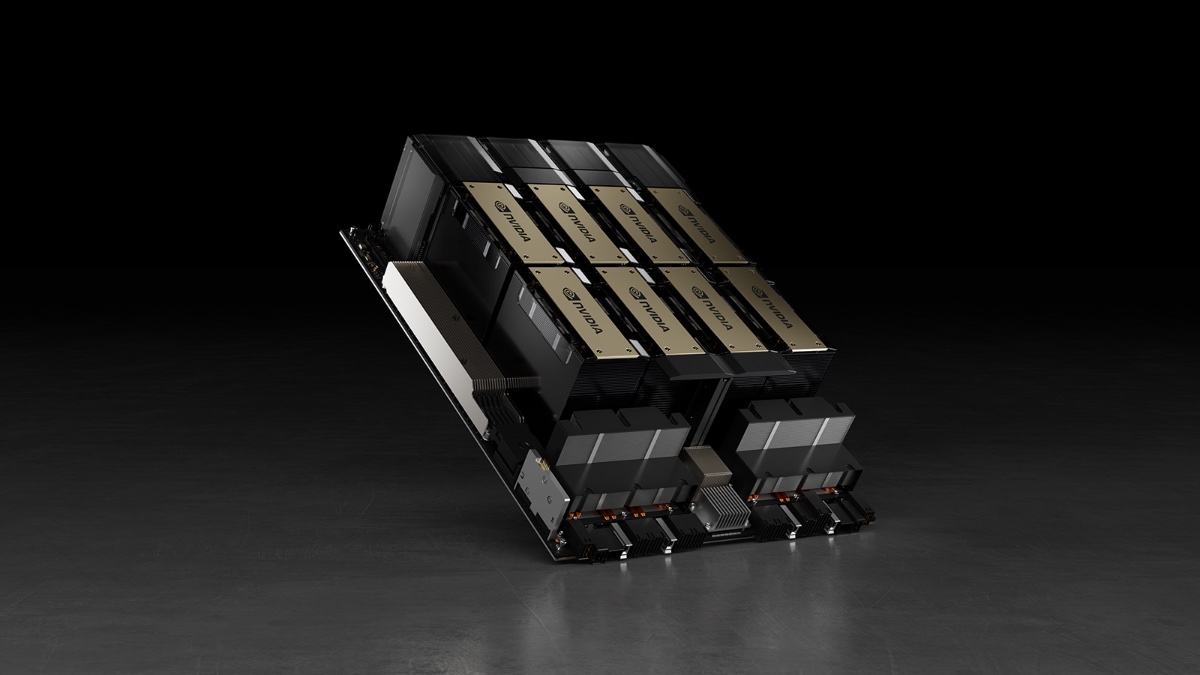
It replaces the variable, often unpredictable monthly billing of cloud providers with a fixed capital expenditure. This cost can be depreciated over several years, providing a clearer financial roadmap. However, engineers must still account for technical challenges like high-density power distribution and complex thermal management.
The Hardware Landscape: GPUs for AI and Deep Learning
The Rise of Local Inference with Consumer Hardware
At the heart of the self-hosted local processing movement is the Graphics Processing Unit (GPU). It has evolved from a gaming peripheral into the primary engine for local Large Language Model (LLM) inference.
For most developers, the entry point is NVIDIA’s consumer-grade GeForce RTX series. The NVIDIA RTX 3090 and RTX 4090 are currently the primary workhorses for local development. Both features 24GB of Video Random Access Memory (VRAM), a critical benchmark in the industry .
In the world of LLMs, VRAM dictates the maximum size of the model a system can load. This 24GB threshold allows users to run mid-range models, such as Llama 3 8B or Mistral 7B, at full precision. While the RTX 4090 offers superior efficiency, the older RTX 3090 remains a staple in the secondary market for budget-conscious teams.
Enterprise Hardware: Scaling for Production
When local AI requirements move into production-grade serving, enterprise hardware becomes a necessity. Professional cards, such as the RTX A6000 and the RTX 6000 Ada Generation, offer 48GB of VRAM. This is double the capacity of flagship consumer cards, enabling larger models without aggressive compression.
The defining advantage of enterprise hardware is its support for advanced interconnect technologies like NVLink. Unlike the standard PCIe bus, NVLink allows multiple GPUs to communicate at much higher speeds. This enables a single system to act as a unified computational block for massive models like the 405B Llama 3.
The Ready–to-Use AI Hardware Landscape Today
Running powerful AI models locally no longer requires you to be a hardcore hardware hacker. The market for pre-assembled, “ready-to-use” AI hardware has fully matured, giving data scientists and developers highly capable, plug-and-play systems tailored to their exact budgets, workflows, and workspace constraints. Whether you need massive raw horsepower for model training or a whisper-silent desktop node just for running inference, there is a pre-built option designed to keep you from spending your weekends troubleshooting component compatibility.
For developers tightly bound to NVIDIA’s CUDA ecosystem for training or fine-tuning, top-tier turnkey workstations have become the gold standard. Fully validated systems like the Puget Systems Peak (starting at $6,500) and the BOXX APEXX S3 (starting at $5,200) come pre-built with NVIDIA’s flagship RTX 5090 (32GB GDDR7). These machines offer massive processing bandwidth, quiet custom-tuned cooling, and a single-point hardware warranty that saves professional teams from dealing with the troubleshooting and downtime of individual part failures.
If your workflow is centered on running models (inference) rather than training them, Apple’s unified memory architecture has taken over as the ultimate silent powerhouse. A pre-configured Mac Studio M4 Max with 128GB of unified memory ($3,999) runs massive 70B-class models smoothly right out of the box. It draws a fraction of the power of a multi-GPU PC and runs almost entirely silent on your desk, making it incredibly popular for solo developers and quiet home offices.
Even the entry-level floor has become highly accessible thanks to ultra-efficient mini PCs. Developers on a budget can opt for compact, always-on nodes like the Beelink SER8 ($559) to host smaller helper models locally. Meanwhile, high-density APUs like the AMD “Strix Halo”-based GMKtec EVO-X2 ($2,349 to $3,299) offer up to 128GB of fast unified RAM, presenting the most affordable path to loading massive models. These micro-nodes provide a highly practical local setup, completely bypassing the frustrating assembly, BIOS tweaking, and driver debugging that usually come with custom DIY rigs.
Cloud GPU Services: Cost and Convenience
Modern AI infrastructure is currently defined by a widening gap between cost and accessibility. While cloud-based GPU services offer immediate scale, the long-term financial burden has forced a shift back toward self-hosted hardware. The market remains split between high-premium enterprise providers and specialized startups.
Self-hosted AI involves running machine learning models on privately owned hardware. Cloud GPU instances follow a managed service model, trading upfront capital expenditure (CapEx) for ongoing operational expenditure (OpEx). While the cloud is maintenance-free, the cumulative cost often exceeds the hardware purchase price within months.
The Hourly Pricing Landscape
A comparative analysis of market rates reveals a tiered structure based on service guarantees. Major hyperscalers charge for their ecosystem, while boutique providers compete on raw price-to-performance ratios. The following table outlines current pricing for various GPU models across the industry.
For many research tasks, technical requirements do not justify the brand premium of major clouds. A researcher fine-tuning a model may not need 400Gbps interconnects if the bottleneck is single-GPU VRAM. In these cases, the “convenience tax” paid to major providers represents a significant drain on capital.
The Hidden Costs of Self-Hosting
Analyzing Operational Expenditures
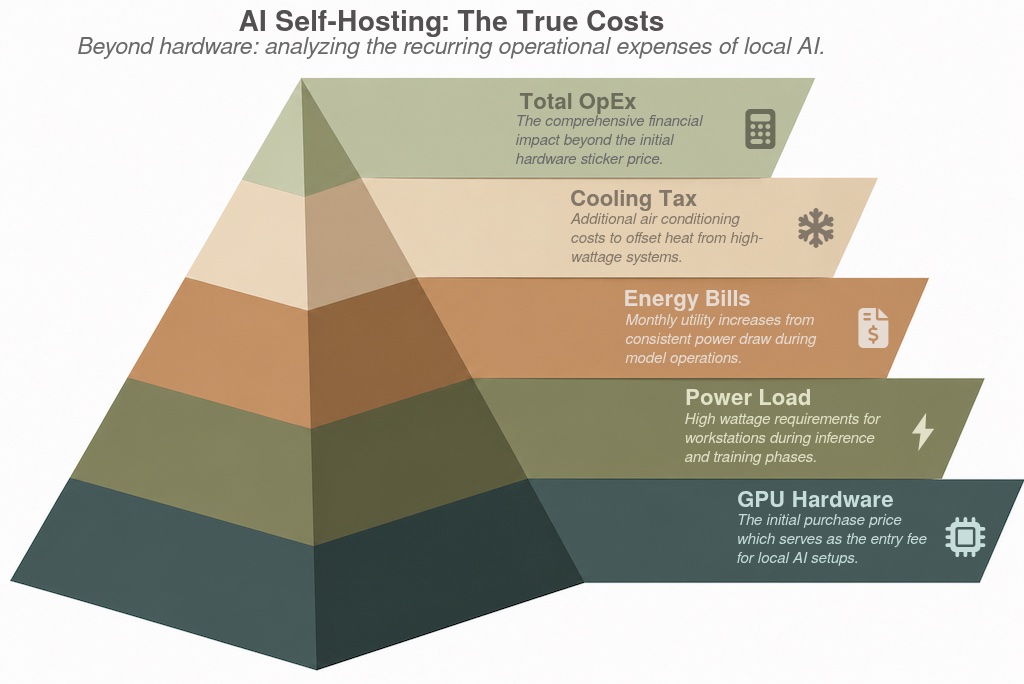
The initial appeal of self-hosting is straightforward: a one-time hardware purchase appears more efficient than mounting hourly rates. However, a rigorous financial analysis reveals that the sticker price of a GPU is merely the entry fee. The transition to local AI involves a complex array of operational expenditures (OpEx).
Electricity represents the most consistent recurring expense in any self-hosted AI setup. AI hardware follows a demanding path, pushing residential and small-office electrical circuits to their limits. A flagship GPU workstation typically draws a heavy load during both inference and training phases.
The Energy and Cooling Burden
Consider a standard environment maintaining a consistent 750W load. At current average utility rates in the United States, operating such a system costs approximately $0.45 per hour. For a researcher running a model 40 hours a week, the monthly electricity bill increases by nearly $72.
Running a 750W load for 24 hours per week results in an annual electricity expenditure of roughly $562 . Calculations often overlook the “cooling tax” associated with high-performance computing. In a residential environment, a 750W machine functions as a space heater, requiring additional air conditioning to maintain stable temperatures.
Case Study: The Deep Learning Dilemma (Local Rig vs. Cloud GPU)
You might be eyeing a local rig with a decent GPU and RAM for about $3,500. It feels like the responsible choice to avoid monthly bills and nickel-and-diming. However, when we run the numbers through a Total Cost of Ownership (TCO) calculator, the results can be surprising.
The break-even point for self-hosted AI usually occurs when hardware utilization stays above 30% of its monthly capacity. If your usage is sporadic, the cloud’s elasticity prevents the waste associated with idle hardware. For consistent, 24/7 workloads, the local rig eventually pays for itself, but only after accounting for power and maintenance.
You can use the Giniloh GPU Cost Calculator to decide what is the alternative that makes economical sense for your use case. To see this calculator in action, let’s look at a common crossroads for data scientists and ML engineers: deciding whether to build a dedicated local deep learning workstation or rely entirely on cloud-hosted instances.
For users looking at premium consumer hardware like the NVIDIA RTX 4090 alongside high-performance system components, here is how to map this hardware scenario.
The Dilemma: Building a premium local PC deep learning computer for $4,200 (RTX 4090 GPU + $2,600 system parts) versus renting cloud GPU compute at $2.16/hour.
Step-by-Step App Walkthrough
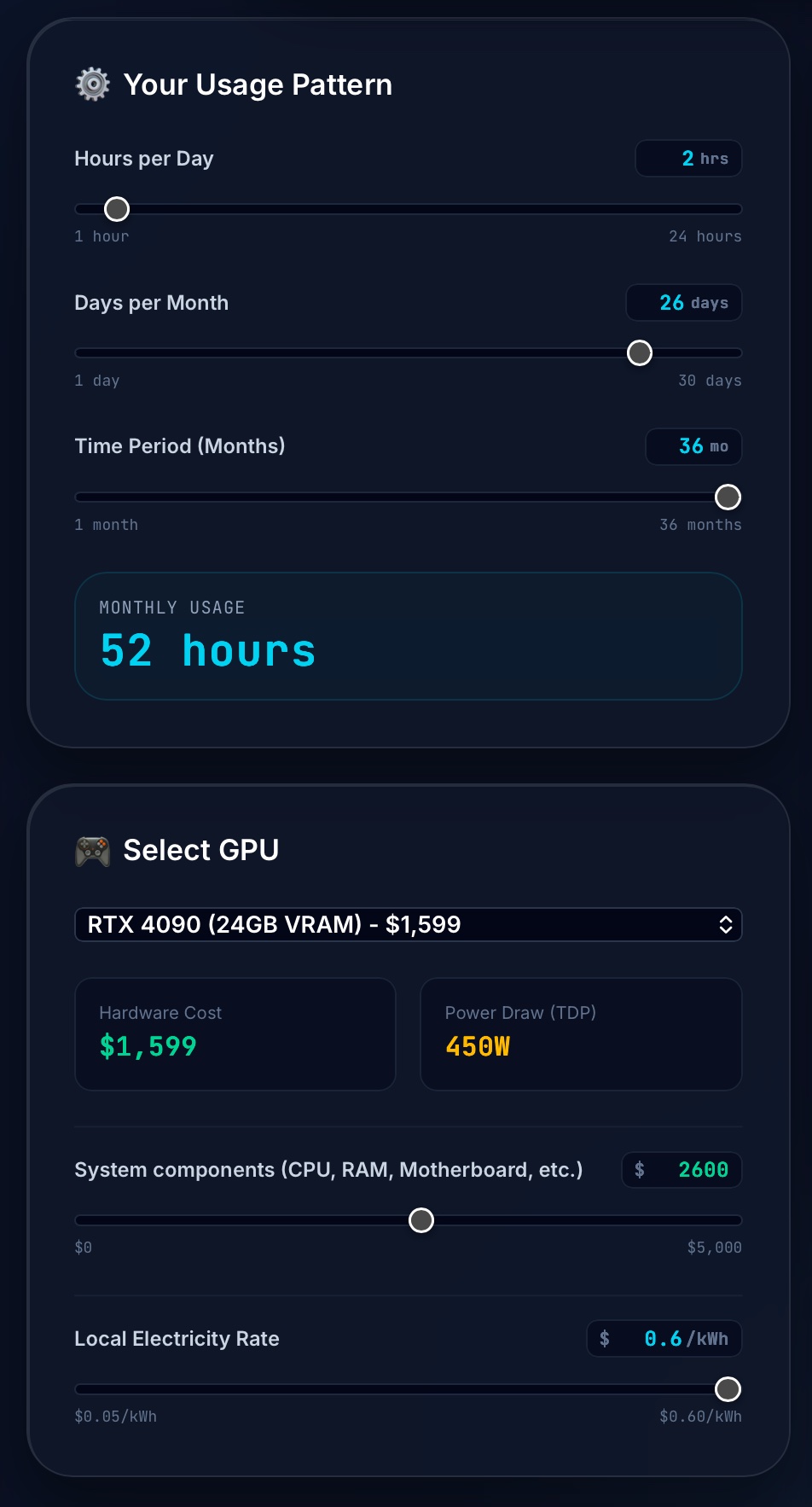
To model this specific scenario in the app, follow these steps:
Navigate to the dedicated GPU Cost Calculator page.
-
Under Your Usage Pattern:
-
Set Hours per Day to
2. -
Set Days per Month to
26(this yields 52 hours/month, which closely mirrors 12 active hours/week). -
Set Time Period (Months) to
36.
-
Under Select GPU:
-
Select RTX 4090 – $1599 – 24GB VRAM from the dropdown menu.
-
In the System components (CPU, RAM, Motherboard, etc.) field, type
2600(bringing the total hardware cost to $4,199). -
In the Local Electricity Rate field, type
0.60.
-
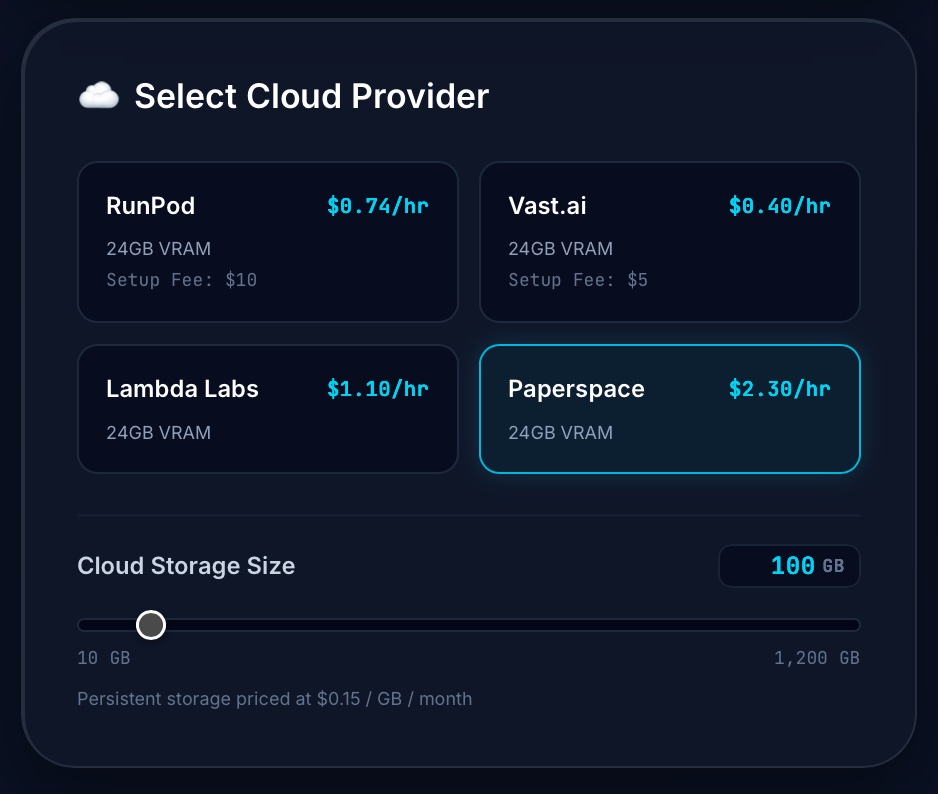
Under Select Cloud Provider:
-
Select Paperspace (or type a custom alternative rate of
2.16/hr). -
In the Cloud Storage Size field, type
100GB.
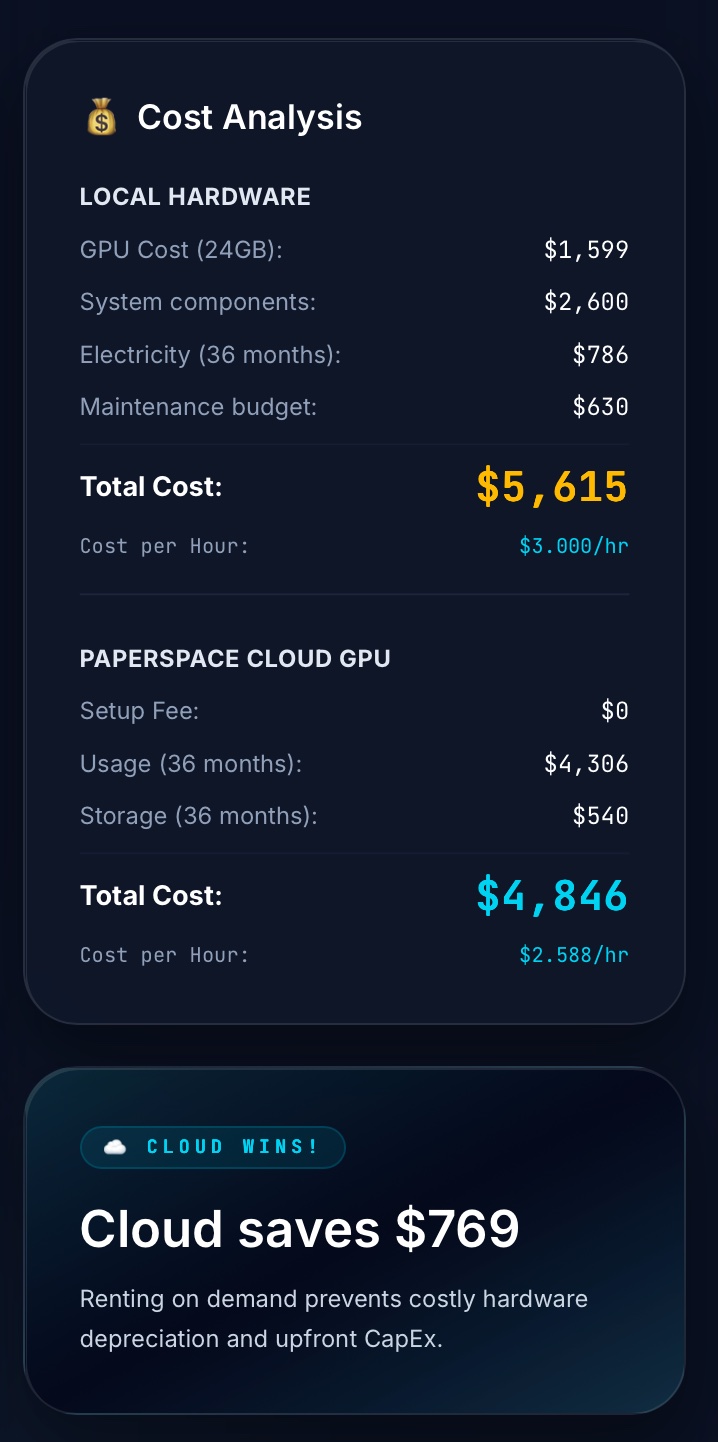
Why Cloud Wins Here: Cloud GPU renting remains financially superior. The local rig cost is $3.00/hr compared to the Paperspace cloud rate (including storage) of $2.59/hr because the weekly compute density (12 hours) is not high enough to amortize the hardware CapEx.
Conclusion: Making Your Decision
If you are only running models 12 hours a week and 24 GB VRAM is enough for you —like many researchers or part-time developers—cloud GPU services are still the smarter bet. That $4,200 local rig we calculated works out to a significant investment that may take years to justify at low utilization.
However, for those prioritizing data sovereignty and a reliable fallback plan, self-hosted AI remains the gold standard. By owning the hardware, you protect your information assets and ensure that your AI capabilities remain intact, regardless of the stability of public service providers.
FAQ
When is it more cost-effective to rent a GPU instead of buying one?
Renting is generally better for sporadic usage, such as running models for 12 hours a week or less. The cloud’s elasticity prevents the financial waste associated with idle hardware and high upfront capital costs.
What is the primary hardware requirement for running local Large Language Models?
Video RAM (VRAM) is the most critical factor, as it determines the maximum size of the model the system can load. A minimum of 24GB of VRAM is recommended to run mid-range models like Llama 3 8B at full precision.
What are the main strategic advantages of self-hosting AI?
Self-hosting provides total control over data privacy and ensures operational continuity if public cloud services become unavailable. It also allows organizations to ‘freeze’ specific model versions, preventing disruptions caused by provider updates.
What hidden costs should be expected when setting up a local AI rig?
Beyond the initial hardware purchase, you must account for significant electricity consumption and the ‘cooling tax’ required to manage heat. Maintenance and hardware depreciation over several years also factor into the total cost of ownership.
How does enterprise-grade hardware differ from consumer GPUs for AI?
Enterprise cards like the RTX 6000 offer higher VRAM capacities and support advanced interconnects like NVLink for high-speed multi-GPU communication. These features are essential for scaling production workloads and running massive models that exceed consumer-grade limits.
What is the break-even point for transitioning from cloud to on-premises hardware?
The break-even point typically occurs when hardware utilization exceeds 30% of its monthly capacity. For consistent, near-constant workloads, the long-term savings on operational expenses eventually offset the high initial investment of a local rig.
References
[1] ### Feeding the Edge: The Necessity of 10Gbps Networks A common architectural blind spot in Edge A.
[2] # CPU vs GPU for AI inference For edge and embedded AI, CPUs outperform GPUs across cost, power co.
[3] ## The Core Decision: Edge or Cloud? At a fundamental level, the choice between edge and cloud pro.
[4] ## **Why GPU Cloud Pricing Is So Confusing in 2026** The GPU cloud market in 2026 is the most dyna.
[5] ## GPU Pricing Comparison: V100 vs L40S vs A100 vs H100 Choosing the right GPU tier is as importan.
[6] ### What are the alternatives to the NVIDIA H100 GPU? Some alternatives to the NVIDIA H100 GPU inc.
[7] I use various LLM’s, speech to text, text to speech, computer vision, and image generation.
[8] They are running hundreds (maybe thousands) of prompts at the same time on each GPU server, 24 hours.
[9] The other fields will calculate your break even time.
[10] The other fields will calculate your break even time.
[11] Example: If a GPU costs $8,000 and cloud rental is $2/hour, break-even is ~4,000 hours (~166 days of.
[12] I have also another LXC hosting Open Web UI and some other services like perplexica AI ( a FOSS alte.
[13] Blow 50 grand on IT hardware, a couple hundred a month on power and bam, you’ve knocked like 4 grand.
[14] The big win isn’t smarter models — it’s lower latency, better privacy, and lower cloud costs.